


TL;DR:
Event attendee data becomes difficult to use when registrations, check-ins, session attendance, and lead notes sit in separate systems. An Event CRM helps organizers bring relevant records together, maintain more complete attendee profiles, segment contacts, and coordinate follow-ups. Its value depends on data accuracy, reliable integrations, clear access rules, and how effectively teams use the information.
Introduction
An event registration list tells you who signed up. It doesn’t necessarily tell you who showed up, which sessions they attended, or which conversations could lead to a business opportunity. Organizers often have to piece these details together from registration spreadsheets, check-in reports, and notes their teams collect.
When these records don’t match, even simple tasks become harder. The team may follow up with someone who never attended, overlook a promising lead, or send the same message to people with very different interests.
This is where event CRM for attendee data becomes useful. It brings relevant attendee records and interactions together, helping organizers maintain complete profiles, understand participation, and plan appropriate follow-ups.
The UK Department for Culture, Media and Sport’s methodology toolkit for capturing engagement numbers highlights how measuring attendance and engagement can become difficult when conventional ticketing or entry-count data is unavailable. The same practical lesson applies to event reporting: organizers need to understand what their data actually captures before using it to make decisions.
What Attendee Data Can an Event CRM Help Organize?
Not every piece of event information belongs in the same record, and not every attendee needs the same level of detail. The goal is to connect relevant information so teams can understand each contact without collecting data they do not need.
| Type of data | Examples | How organizers can use it |
| Registration data | Name, email, organization, ticket type, registration status | Confirm registrations and group attendees |
| Contact and profile data | Job title, company, contact preferences, previous event history | Understand who the attendee is and their relationship with the organization |
| Ticket and attendance data | Ticket category, check-in status, arrival time, registration ID | Reconcile registrations with actual attendance |
| Session attendance | Sessions attended, where this information is captured | Plan relevant updates and content recommendations |
| Engagement data | Survey responses, recorded interactions, event-related activity | Identify interests and evaluate participation |
| Communication history | Previous messages, responses, follow-up records, where captured | Coordinate communication and avoid unnecessary repetition |
| Lead information | Business requirements, conversation notes, lead owner, next action | Prioritize sales follow-up and lead nurturing |
The exact information available depends on the registration, check-in, event engagement, and CRM systems being used. For example, registration alone cannot confirm that someone attended a session. That requires a session attendance-tracking process.
A useful event attendee database therefore needs more than a collection of names and email addresses. It needs accurate records, clear data sources, and enough context to help the team decide what to do next.
How Does Event CRM for Attendee Data Management Work?
An Event CRM for attendee data helps organizers turn scattered records into actionable information by centralizing data, segmenting audiences, tracking interactions, and supporting follow-up. The exact process depends on the platform and its connected systems.
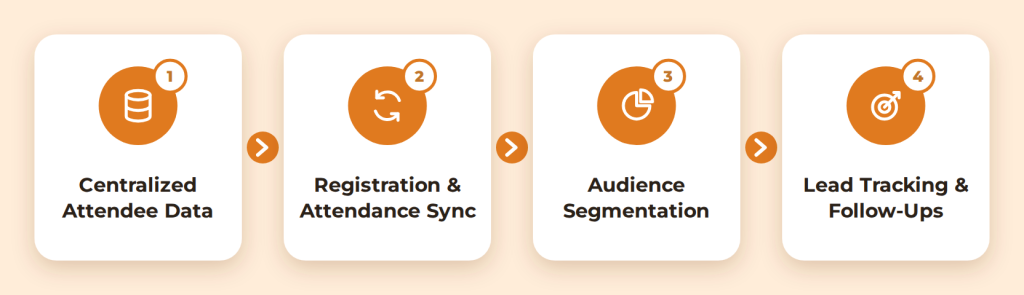
1. Centralizes Attendee Information
Registration teams, event staff, and sales representatives may maintain separate records, creating duplicate contacts and inconsistent details.
A CRM can combine contact details, event history, communication records, and relevant lead information in one attendee profile. Reliable identifiers help detect duplicates, while uncertain matches should be reviewed before merging records.
2. Connects Registration and Attendance Records
Registration data shows who signed up, while check-in data identifies who arrived. Connecting them helps organizers distinguish registered attendees from no-shows and walk-ins.
When the relevant systems support integration, data can transfer between registration and CRM platforms. Before relying on this process, check which fields synchronize, how frequently updates occur, and how the systems handle duplicate or conflicting records.
3. Segment Attendees and Support Personalized Engagement
Sending the same message to every registrant can make follow-up less useful. A workshop attendee may need session resources, while a prospect who requested a meeting may need a direct response.
Attendee segmentation lets teams group contacts using relevant information, such as ticket category, stated interests, or recorded interactions. These groups can support more appropriate communication.
Use behavioral data carefully. Session attendance may indicate interest in a topic, but it doesn’t automatically establish purchase intent. Segments should reflect what the records genuinely show.
Organizers can explore another application of this information in how to use attendee data to improve networking before, during, and after events.
4. Tracks Leads and Coordinates Follow-Ups
Event conversations can produce valuable leads, but notes stored on paper or in separate apps may never reach the wider team.
Event CRM attendee data management helps organize contact details, conversation notes, lead owners, and next actions. Where supported, lead scoring can prioritize contacts using defined criteria, such as a request for a consultation. Follow-up automation can then help teams deliver relevant messages or resources based on each contact’s needs.
How Can Organizers Use Attendee Data Before, During, and After an Event?
Event CRM for Attendee data serves different purposes throughout the event lifecycle. Organizing it around these stages helps teams collect the right information and act on it.
Before the event: Prepare the records.
Standardize registration fields, decide which information is necessary, and establish a process for handling duplicates. Clarify team access and test integrations before event activity increases.
If you plan to segment attendees, define the criteria in advance. Ticket category may help with event updates, while stated session interests may guide relevant content recommendations.
During the event: Record attendance and interactions
Use the available check-in process to record arrivals and supported tracking tools to capture session participation or business conversations. Staff should know where to enter notes and which details are necessary.
A missing session scan doesn’t necessarily prove that someone was absent; the tracking method may have missed the entry. Mark uncertain information accordingly instead of treating it as confirmed attendance.
For guidance on coordinating check-in, badge printing, and attendee tracking, see Dreamcast’s onsite event operations guide.
After the event: Reconcile and follow up
Compare registration and attendance records, review captured leads, and resolve data issues before contacting attendees. A prospect who requested a meeting may need direct outreach, while a session attendee may benefit from related resources. A no-show may need a different message, where appropriate.
This process helps teams prioritize follow-ups based on recorded interactions rather than sending the same message to everyone.
Event CRM vs. Traditional CRM
Both systems can help manage contact relationships, but their suitability depends on the workflows an organization needs. A traditional CRM may also support event-related activities through customization or integrations, so the distinction isn’t absolute.
| Area | Event CRM | Traditional CRM |
| Primary context | Attendee and event-related contact activity | Broader customer and sales relationships |
| Event data | May organize registration, attendance, and event interactions when supported | May require integrations or customization for event-specific records |
| Audience segmentation | Can use available attendee and event attributes | Can segment contacts using its supported customer and activity data |
| Event follow-up | May connect event interactions with lead follow-up workflows | Can manage follow-ups using its existing sales and communication workflows |
| Best fit | Teams needing event-related contact context in their workflow | Teams managing broader customer relationships, with event needs handled through available features or integrations |
Choose based on the processes your team needs to manage, not just the product label. Confirm whether the platform supports the specific registration, attendance, engagement, and follow-up workflows you require.
Which Attendee Data Should Organizers Measure?
Collecting more information does not automatically produce better decisions. Choose measurements based on the questions the event team needs to answer.
| Question | Useful information | What it helps clarify |
| How many registrants attended? | Registration and check-in records | Attendance rate and no-shows |
| Which sessions attracted attendees? | Session attendance records, where available | Participation across the programme |
| Which contacts need sales attention? | Lead details, conversation notes, requested actions | Follow-up priorities |
| Which communication performed well? | Delivery and response data available in the system | How attendees responded to messages |
| What should change next time? | Attendance, engagement, feedback, and follow-up outcomes | Areas to improve in future events |
An event analytics dashboard can make these measurements easier to review when the underlying event CRM attendee data is accurate, and the reports clearly define each metric.
An attendee engagement score may summarize selected activities, but its meaning depends on how it’s calculated. Teams should understand the scoring criteria and limitations before using it to compare attendees.
For more guidance, read how to use event data analytics to measure and improve events.
What Should Organizers Check Before Choosing Attendee Management Software?
The right attendee management software should fit the team’s actual workflow, not simply offer the longest feature list.
Evaluate these areas before making a decision:
- Data quality: Can the system identify or flag duplicate contacts and support updates to existing records?
- Integration requirements: Does it connect with the registration, check-in, lead-capture, and CRM tools you already use?
- Segmentation and communication: Can teams create useful audience groups and manage relevant follow-up activities?
- Reporting: Can organizers distinguish registrations, attendance, engagement, and lead outcomes instead of combining them into one unclear metric?
- Access and accountability: Can access be limited according to team responsibilities, with suitable records of changes where available?
- Data portability: Can authorized users export the information they need in a usable format?
Do not assume that every Event CRM includes session attendance tracking, advanced engagement scoring, or automatic synchronization with every registration platform. Confirm the capabilities, supported integrations, and limitations with the provider.
How to Manage Attendee Data Responsibly and Turn It Into Better Decisions
Effective event CRM attendee data management means keeping records accurate while controlling how information is collected, accessed, used, and retained.
The European Commission’s GDPR principles cover data minimization, accuracy, storage limitation, and confidentiality for processing subject to the regulation.
To manage attendee data responsibly:
- Collect only necessary information and explain how it will be used.
- Meet applicable consent or lawful-basis requirements.
- Restrict access to authorized team members.
- Correct inaccurate records and define retention and deletion rules.
- Review integrations and exports to prevent unnecessary data sharing.
Accurate, responsibly managed records help organizers distinguish registrations from actual attendance, identify meaningful interactions, prioritize leads, and personalize follow-ups. An Event CRM can help organize this information and coordinate next steps. Explore Dreamcast’s Event CRM solution to see whether it fits your event lead management and communication needs.
Frequently Asked Questions:
Ans. An Event CRM helps organizers organize attendee records, manage leads, segment audiences, and coordinate follow-ups. Its capabilities depend on the platform and connected systems.
Ans. Yes, if the CRM and event systems support the required integration. Organizers should verify which fields synchronize and how duplicate or conflicting records are handled.
Ans. Registration data captures information submitted during sign-up. Attendee data may also include check-in status, session participation, interactions, feedback, and follow-up history.
Ans. Use consistent registration fields, reliable contact identifiers, duplicate checks, and tested integrations. Reconcile registration and attendance records after the event, reviewing uncertain matches before merging them.