

Tl:DR
WhatsApp event registration allows attendees to register for conferences, webinars, workshops, trade shows, and other events directly through WhatsApp. Instead of filling out lengthy forms or navigating separate registration websites, attendees can share their details through a chat, receive confirmation messages, get event reminders, and access important event information. Organizers can use WhatsApp Business tools, chatbots, automated workflows, and event management platforms to manage registrations, answer questions, send tickets, and share QR codes. WhatsApp-based event registration can simplify the registration process, improve communication, and reduce manual work when it is integrated with a reliable registration system.
Intro
Event registration is the first interaction attendees have with an event, and a complicated process can discourage people from completing it. Traditional registration forms often require attendees to open a website, enter personal details, and wait for confirmation.
WhatsApp offers another approach by allowing people to register through a messaging app they already use. With WhatsApp event registration, organizers can collect attendee information, confirm registrations, send reminders, and share event updates through a familiar chat interface.
This approach can work for both online and in-person events, provided organizers choose the right tools and follow appropriate data protection practices.
This article explains how WhatsApp event registration works, its key features and benefits, the challenges organizers should consider, and how it compares with traditional registration methods.
What Is WhatsApp Event Registration? (Direct Answer)
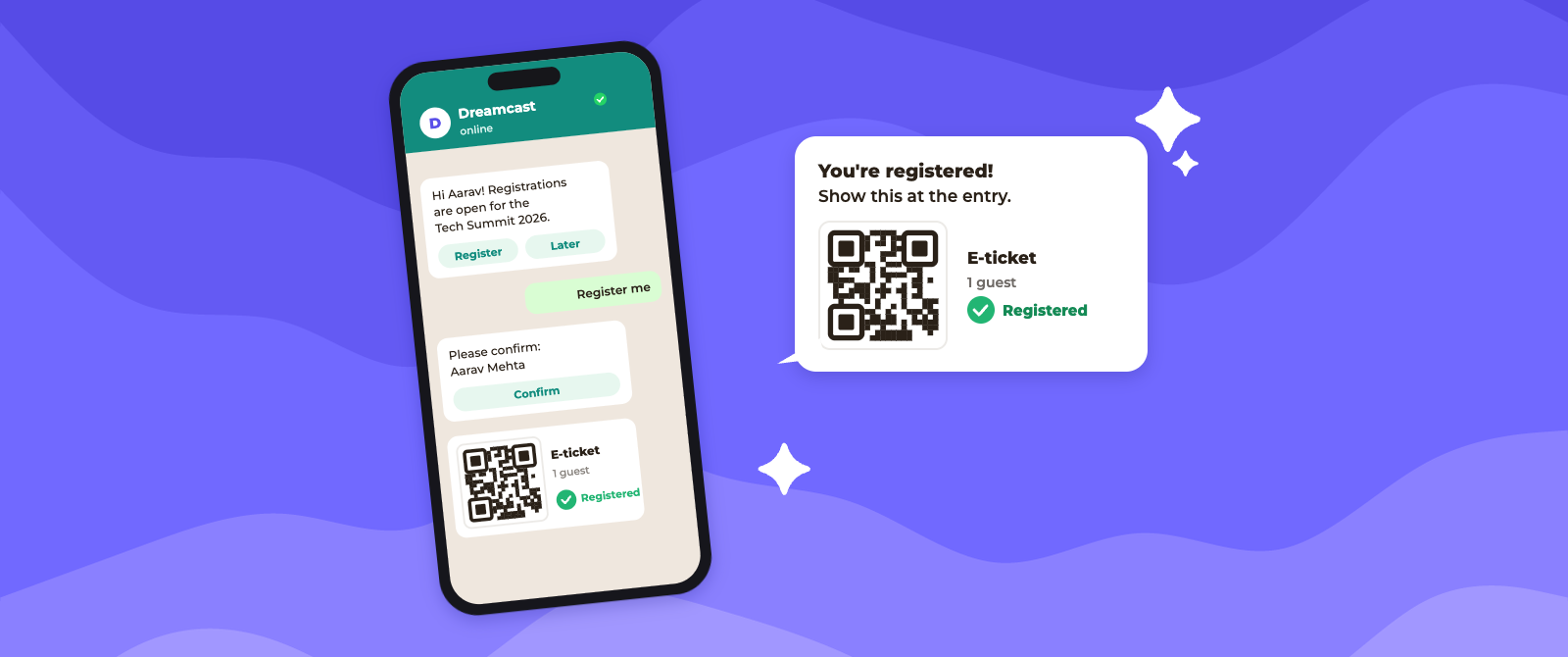
WhatsApp event registration is a process that allows attendees to sign up for an event by interacting with an organizer through WhatsApp. Depending on the setup, attendees can register by sending a message, selecting options from an interactive menu, completing a chat-based form, or opening a registration link shared in a conversation.
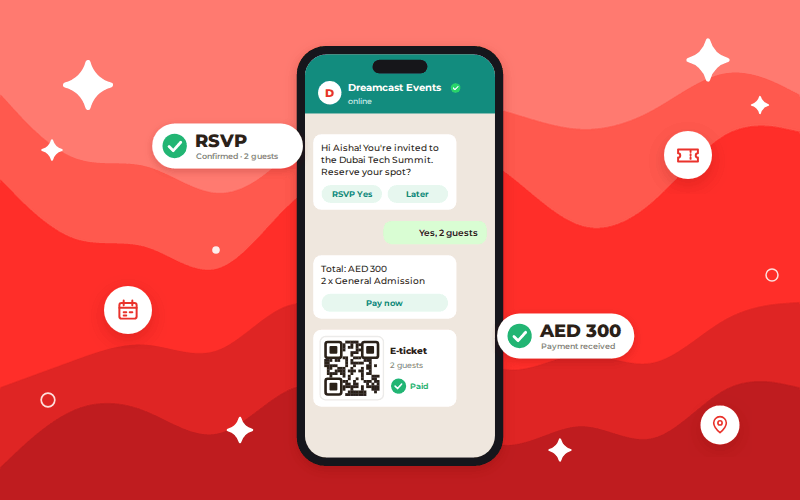
For example, an organizer hosting a business conference could share a WhatsApp number on its website, social media pages, or promotional materials. An interested attendee sends a message such as “Register for the conference.” An automated assistant then asks for the attendee’s name, email address, company, and other required details. Once the information is validated and the registration is recorded, the attendee receives a confirmation message.
The entire process can take place within WhatsApp, although some registrations may require an external payment page or a secure form for additional information.
Note: WhatsApp event registration is not a standalone event management system by default. It is a registration channel that can be connected to a customer relationship management (CRM) system, event registration platform, payment gateway, or attendee database.
Common Use Cases
WhatsApp-based event registration can be useful for several types of events:
- Conferences and business events: Collect attendee details, confirm registrations, and distribute event schedules.
- Webinars and virtual events: Register participants, share joining links, and send session reminders.
- Trade shows and exhibitions: Capture visitor information, distribute digital passes, and communicate venue details.
- Workshops and training sessions: Manage sign-ups, communicate prerequisites, and share preparation materials.
- Corporate events: Handle employee registrations, guest lists, and event-specific updates.
- Community events: Allow local audiences to register without navigating complicated websites.
The best use case depends on event size, registration complexity, attendee preferences, and the organizer’s need for automation.
How Does WhatsApp Event Registration Work?
WhatsApp event registration works through a sequence of interactions that collect attendee information, validate registration details, and deliver confirmation messages. The process can be handled manually for small events or automated using the WhatsApp Business Platform and an event registration system for larger events.
Here is how the process typically works.
1. Attendees Discover the Registration Channel
Organizers share their WhatsApp number or a click-to-chat link across event websites, email campaigns, social media, digital advertisements, and promotional materials. Attendees click the link and start a conversation with the event organizer. For example, a person interested in a virtual conference might send a message saying, “I want to register for the event.”
2. The Registration Process Begins
Once the conversation starts, the attendee receives a welcome message with instructions or registration options. A chatbot can guide the attendee through the process, while a staff member can manage registrations manually.
For example, the chatbot might ask whether the attendee wants to register for a conference, workshop, or webinar. It can then direct the person to the relevant registration flow.
3. Attendee Information Is Collected
The system requests the information required to complete registration. This may include:
- Full name
- Email address
- Phone number
- Company or organization
- Job title, if relevant
- Preferred sessions or event category
- Ticket type or attendance preference
Information can be collected through conversational questions, interactive forms, or secure external registration pages. The automated WhatsApp event registration system should request only the information necessary for the event.
4. Registration Details Are Validated
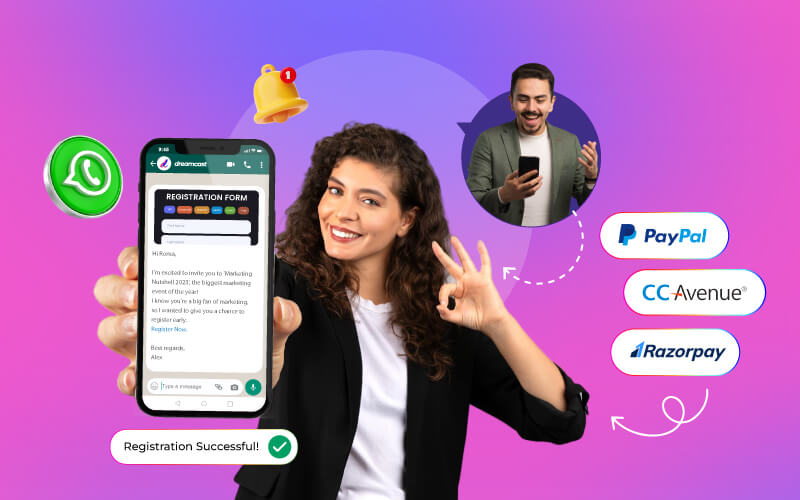
The registration system checks whether the submitted information is complete and valid. Depending on the event requirements, it may also verify email addresses, check eligibility, apply registration limits, or determine whether a ticket category is available. For paid events, attendees may be directed to a secure payment gateway. The registration should be marked as confirmed only after the required payment or approval has been completed.
5. Attendees Receive Confirmation
After successful registration, the attendee receives a WhatsApp confirmation message. This message may contain the event name, date, time, venue, or joining link, registration ID, and other relevant details. For example, an attendee registering for an in-person conference could receive a digital ticket with a QR code that staff can scan at the venue.
6. Automated Reminders and Event Updates Are Sent
Before the event, organizers can send reminders, schedule changes, venue instructions, speaker announcements, and other useful updates.
For business-initiated messages, the WhatsApp Business Platform requires compliance with its messaging rules, including approved templates when messaging outside the 24-hour customer service window. Organizers should also obtain appropriate permission before sending messages.
7. Attendance Is Recorded
For in-person events, attendees can present their QR-coded tickets at check-in. Event staff scan the codes to validate tickets and record attendance in the event management system.
For virtual events, attendance can be recorded through the webinar platform or virtual event software. WhatsApp facilitates communication, while the connected event system manages the attendance data.
Read More: Event Sign-Ups with WhatsApp: Managing Paid & Unpaid Registrations
Key Features of WhatsApp Event Registration
An effective WhatsApp-based event registration system combines messaging, registration management, and automation. The following features can make the process more efficient.
- Automated registration chatbot: Answers common questions, guides attendees through registration, and collects the required details without requiring staff to respond to every message manually.
- Interactive registration forms: Allow attendees to select options, enter information, and complete structured forms within supported WhatsApp experiences. WhatsApp Flows, for example, support interactive, multi-screen experiences for tasks such as form submission and appointment booking.
- Automated confirmation messages: Send registration acknowledgments, ticket details, registration IDs, and payment status updates after the relevant action is completed.
- QR code ticket distribution: Delivers digital tickets containing unique QR codes that can be scanned at the venue. This feature generally requires integration with ticketing or event management software.
- Automated reminders and notifications: Sends timely reminders about registration deadlines, event start times, session schedules, and important changes, subject to WhatsApp messaging rules.
- Payment gateway integration: Connects attendees to secure payment options and helps organizers track whether a registration has been paid for or is still pending.
- CRM and event management integration: Syncs attendee information with registration databases, customer relationship management systems, and other event tools to reduce duplicate data entry.
- Live attendee support: Allows attendees to ask questions about the event, registration requirements, ticket changes, accessibility, and venue directions.
- Registration tracking and reporting: Helps organizers monitor registration counts, completed sign-ups, abandoned registration attempts, and message delivery or engagement metrics when supported by the connected tools.
- Multilingual communication: Enables organizers to provide registration instructions and event information in the languages supported by their chatbot or customer service team.
Benefits of WhatsApp Event Registration
WhatsApp event registration can improve the attendee experience while helping organizers manage communication and registration workflows more efficiently.
1. Simplifies the Registration Process
Attendees can begin registration through a familiar messaging interface instead of navigating multiple pages. A short, guided conversation can make registration easier, especially for people who prefer mobile communication.
For example, a workshop organizer can ask attendees for their names, preferred session, and email addresses through a conversational flow rather than requiring them to complete a lengthy form. However, the process should remain simple. Asking too many questions through chat can be just as frustrating as a complicated website form.
2. Improves Registration Completion Rates
Every additional step in a registration process creates an opportunity for an attendee to leave without completing the sign-up. WhatsApp can reduce friction by providing clear instructions, answering questions immediately, and guiding attendees through the next step. Organizers can also use reminders to help people complete registrations that remain pending, where messaging permissions and platform rules allow.
The actual improvement in completion rates depends on the audience, event type, registration design, and quality of follow-up communication.
3. Reduces Manual Administrative Work
Automated workflows can handle repetitive tasks such as collecting details, answering frequently asked questions, sending confirmations, and distributing event instructions. This allows event teams to spend less time responding to routine queries and more time managing speakers, vendors, attendee requirements, and event logistics. For large events, integration with registration software is especially important because it prevents staff from manually transferring information between WhatsApp conversations and spreadsheets.
4. Enables Faster and More Direct Communication
Email confirmations can be overlooked or filtered into spam folders. WhatsApp offers another channel through which organizers can share important information. Attendees can receive reminders, venue updates, schedule changes, and joining instructions in the same conversation they used to register. This can make it easier to find event information when needed.
Message delivery, read status, and engagement depend on the tools available and the recipient’s settings. Organizers should not assume that every message will be read.
5. Supports Better Attendee Engagement
WhatsApp enables two-way communication before, during, and after an event. Organizers can answer questions, share session information, collect feedback, and direct attendees to relevant resources. For example, a conference attendee could ask for the location of a breakout session and receive directions through the event’s support chatbot. This interaction can help attendees feel better informed and supported throughout the event journey.
6. Makes Event Updates Easier to Manage
Last-minute changes are common in event planning. A speaker may be replaced, a session may move to another room, or a webinar link may need to be updated. WhatsApp provides a direct communication channel for sharing these updates with registered attendees. When connected to an event management system, organizers can send relevant information to the appropriate audience rather than contacting everyone individually.
7. Helps Organizers Manage Registrations at Scale
The WhatsApp business platform supports integrations and automated workflows that can handle larger volumes of interactions than a manual messaging process. For example, an exhibition organizer can use automated registration collection, confirmation messages, and QR ticket distribution while keeping attendee records in a central database. However, scalability depends on API access, messaging limits, system capacity, integration quality, and the number of staff available to handle exceptions.
WhatsApp Event Registration Best Practices
To make event registration through WhatsApp effective, organizers should prioritize convenience, accuracy, privacy, and clear communication.
- Use a dedicated business number: Establish a recognizable communication channel for event registration and support. Clearly display the organizer’s identity so attendees know whom they are contacting.
- Make registration instructions clear: Explain how to start registration, what information is required, and how long the process is likely to take. Avoid confusing menus or unnecessary steps.
- Collect only essential information: Request details needed for registration, ticketing, eligibility, and event operations. Avoid collecting sensitive information through ordinary chat when a more appropriate secure method is available.
- Obtain consent for messages: Clearly explain which event-related messages attendees may receive and how they can opt out of optional communications. Follow WhatsApp’s business messaging policies and applicable privacy laws.
- Keep chatbot conversations short: Ask one clear question at a time, provide understandable response options, and allow attendees to correct mistakes or return to previous steps where possible.
- Integrate with event registration software: Store registrations in a central system so that confirmations, ticket issuance, attendee lists, and attendance records remain consistent.
- Send timely, relevant reminders: Schedule reminders around meaningful milestones, such as registration confirmation, the day before the event, or the event start time. Avoid excessive notifications.
- Use unique QR codes for check-in: Generate a unique ticket identifier for each registration and validate it against the event database. Avoid relying on a screenshot of a generic QR code as proof of admission.
- Provide human support: Make it easy for attendees to speak to a real person when they face payment issues, registration errors, accessibility concerns, or other complex problems.
- Test the complete workflow: Test registration, data validation, payment, confirmation, ticket delivery, cancellations, and check-in before launching the process to attendees.
- Monitor performance: Track completed registrations, drop-off points, failed messages, support requests, and check-in results to identify areas that need improvement.
- Plan for technical failures: Keep an alternative registration link, an exportable attendee list, and a backup check-in process available in case WhatsApp or an integration becomes unavailable.
Challenges and Limitations of WhatsApp Event Registration
Although WhatsApp offers several advantages, it is not suitable for every event registration requirement.
1. Limited Suitability for Complex Registration Forms
Some events require extensive information, document uploads, eligibility screening, or detailed session selections. Collecting all this information through a conversation may be inconvenient.
A hybrid approach works better in these cases: use WhatsApp to initiate registration and provide guidance, then direct attendees to a secure, structured form when necessary.
2. Dependence on Internet Access and WhatsApp Availability
Attendees need access to WhatsApp and a reliable internet connection to use the messaging-based process. Some people may prefer email, telephone, or a traditional website.
Offering alternative registration channels helps ensure that people are not excluded because of their communication preferences or technical limitations.
3. Data Privacy and Security Responsibilities
Registration involves personal information, including names, contact details, and sometimes professional information.
Organizers must explain how attendee data will be used, restrict access to authorized staff, establish appropriate retention periods, and follow applicable privacy requirements. Business messaging integrations also require careful evaluation of how data is stored and processed. WhatsApp should not be treated as a substitute for a properly managed attendee database or a comprehensive data protection program.
4. Messaging Policies and Costs
Automated messaging through the WhatsApp business platform is subject to platform rules, template requirements, and applicable charges. Messages sent outside the customer service window generally require approved templates, and costs can vary depending on message category and recipient market.
Organizers should review current policies and pricing before estimating the cost of large registration campaigns.
5. Integration and Technical Complexity
Advanced registration workflows may require API configuration, chatbot development, database integration, and payment gateway connections.
Poorly configured integrations can result in duplicate registrations, delayed confirmations, incorrect ticket details, or inconsistent attendance records. Testing and ongoing technical support are therefore essential.
6. Risk of Message Overload
Frequent reminders and irrelevant promotional messages can frustrate attendees and lead them to mute, block, or report the business.
Organizers should communicate only when there is a clear benefit to the recipient and provide straightforward ways to manage optional communications.
7. Not a Complete Replacement for Event Management Software
WhatsApp is primarily a communication channel. It does not automatically provide every capability required to manage a complex event, such as seat allocation, approval workflows, capacity controls, badge printing, multi-track scheduling, or detailed attendance analytics.
For large conferences and exhibitions, WhatsApp is most effective when used alongside a dedicated event registration and management platform.
WhatsApp Event Registration vs. Traditional Registration Methods
WhatsApp registration and traditional registration methods serve similar purposes, but they differ in how attendees interact with the organizer and how the registration process is managed.
| Comparison factor | WhatsApp event registration | Traditional registration methods |
| Registration process | Conversational sign-up through WhatsApp | Online forms, websites, email, or paper forms |
| Ease of use | Familiar messaging interface | Depends on form design and registration channel |
| Data collection | Chat prompts, interactive forms, or integrated forms | Structured fields in a registration form |
| Confirmation | Can be delivered directly through WhatsApp | Usually email, website confirmation, or printed receipt |
| Reminders | Direct messaging, subject to platform rules and consent | Commonly sent through email, SMS, or phone calls |
| Automation | Chatbots and integrated workflows can automate repetitive tasks | Depends on the registration software and integrations |
| Complex forms | May require an external form or specialized workflow | Often better suited to detailed forms and document collection |
| Payment processing | Usually requires a payment integration or secure payment link | Can be built directly into a registration website |
| QR ticketing | Available through integration with ticketing software | Commonly supported by event registration platforms |
| Accessibility | Convenient for WhatsApp users; not ideal for everyone | Offers more options when multiple registration channels are available |
| Data management | Requires a connected database or event system for centralized records | Often built into dedicated registration software |
| Cost considerations | May involve platform, automation, integration, and messaging costs | May involve software subscriptions, transaction fees, or administrative costs |
Which method should organizers choose?
WhatsApp is a strong option when convenience, direct communication, and attendee support are priorities. Traditional online registration is often more suitable for complex forms, detailed ticket selection, and extensive data collection. For many events, a hybrid approach provides the best balance: attendees discover and begin registration through WhatsApp, complete any necessary detailed forms through a secure registration page, and receive confirmations and reminders through their preferred communication channels.
Read More: WhatsApp For Events – Make Your Events Smart With WhatsApp Automation
Conclusion
WhatsApp event registration provides a convenient way for attendees to sign up for events through a familiar messaging channel. It can simplify registration, automate routine communication, improve access to event information, and support a smoother attendee experience.
However, its effectiveness depends on the registration workflow, integration quality, data protection practices, and the complexity of the event. For small workshops and webinars, a simple chat-based process may be sufficient. For large conferences, exhibitions, and corporate events, connecting WhatsApp with dedicated event registration software offers better control over attendee records, ticketing, payments, and check-in.
The most effective approach is to use WhatsApp where it adds convenience while relying on a centralized event management system for accurate registration data and operational control.
FAQs
Yes. Attendees can register by interacting with an organizer, chatbot, or supported interactive registration flow. Depending on the setup, they may provide details directly in chat or complete a linked form. Payment or additional verification may require another system.
Not necessarily. Basic manual registration through WhatsApp may not require a separate registration platform, but businesses may incur costs for the WhatsApp business platform, chatbot tools, messaging, integrations, and event software. Payment processing may also involve transaction fees.
The total cost depends on the event’s size, workflow, and technology requirements.
Yes. The WhatsApp business platform can be integrated with chatbots and event registration systems to automate information collection, registration confirmations, reminders, and ticket distribution. More advanced workflows may require custom development or third-party tools.
Yes. Organizers can send digital tickets containing QR codes through WhatsApp when their ticketing or event management system supports ticket generation and message delivery. Each ticket should have a unique identifier that can be validated during check-in.
Yes, when supported by reliable automation and event management software. A large conference may use WhatsApp for registration assistance, confirmations, reminders, and ticket delivery while using a central registration database to manage capacity, attendee categories, badge printing, and check-in.
A manual messaging process alone may not be sufficient for a high-volume event.
Yes. Organizers can collect attendee details through WhatsApp, confirm registration, and send webinar joining instructions and reminders. The webinar platform should still manage participant access and attendance tracking.