


TL;DR
- Large events bring bigger registration challenges: As attendee numbers grow, issues like high registration traffic, payment failures, and long check-in queues become more common.
- Simplify the registration experience: A short, mobile-friendly registration process with secure payment options can reduce drop-offs and improve attendee satisfaction.
- Use automation to save time: Automated emails, attendee management, and badge printing help minimize manual work and reduce registration errors.
- Prepare for onsite registrations: QR code check-in, self-service kiosks, and walk-in registration tools ensure a faster, smoother entry experience.
- Track registrations in real time: Live dashboards and analytics help you monitor registrations, ticket sales, and attendee data to make informed decisions.
- Choose technology built for scale: A reliable event registration platform can handle growing attendee numbers while delivering a seamless experience from registration to check-in.
Introduction
A well-designed registration flow makes it easy for people to sign up, complete payments, receive event information, and check in on event day without any unnecessary friction. It also helps organizers collect accurate attendee data, automate communication, and manage registrations more efficiently.
Your event registration flow is more than just a form people fill out. It is the beginning of the attendee experience. So, whether you are organizing a corporate conference, an industry expo, or a business summit, the registration process is often the first interaction attendees have with your event.
If it’s confusing, time-consuming, or asks for too much information, potential attendees may abandon the process before completing their registration.
The bright side is that creating an effective registration flow is not complicated. You can improve registration conversions while creating a smoother experience for everyone involved by focusing on the attendee journey and simplifying each step.
In this blog, we will discuss the step-by-step process of designing an event registration flow for conferences, expos, and corporate events. It will cover planning your registration requirements and optimizing the experience before, during, and after your event.
Why Your Registration Flow Matters More Than You Think
Many organizers spend months planning speakers, sponsors, venues, and marketing campaigns, but give far less attention to the registration experience itself.
That’s a missed opportunity.
Your registration flow influences far more than the number of completed registrations. It affects how attendees perceive your event, how much administrative work your team handles, and even how smoothly your event runs onsite.
For example, a short, intuitive registration process can encourage more people to complete their sign-up, while an overly complicated one often leads to abandoned registrations. Similarly, collecting the right attendee information from the beginning makes badge printing, check-ins, networking, and post-event reporting much easier.
A thoughtfully designed registration flow also reduces manual work by automating confirmations, reminders, payment processing, and attendee management. Instead of spending time fixing registration issues, your team can focus on delivering a better event experience.
64% of attendees say immersive event experiences have the biggest positive impact on their overall event experience.
In short, a great registration flow benefits everyone. It makes registering easier for attendees while helping organizers stay in control throughout the event lifecycle.
So, without further ado, let us outline the steps for designing a better registration flow.
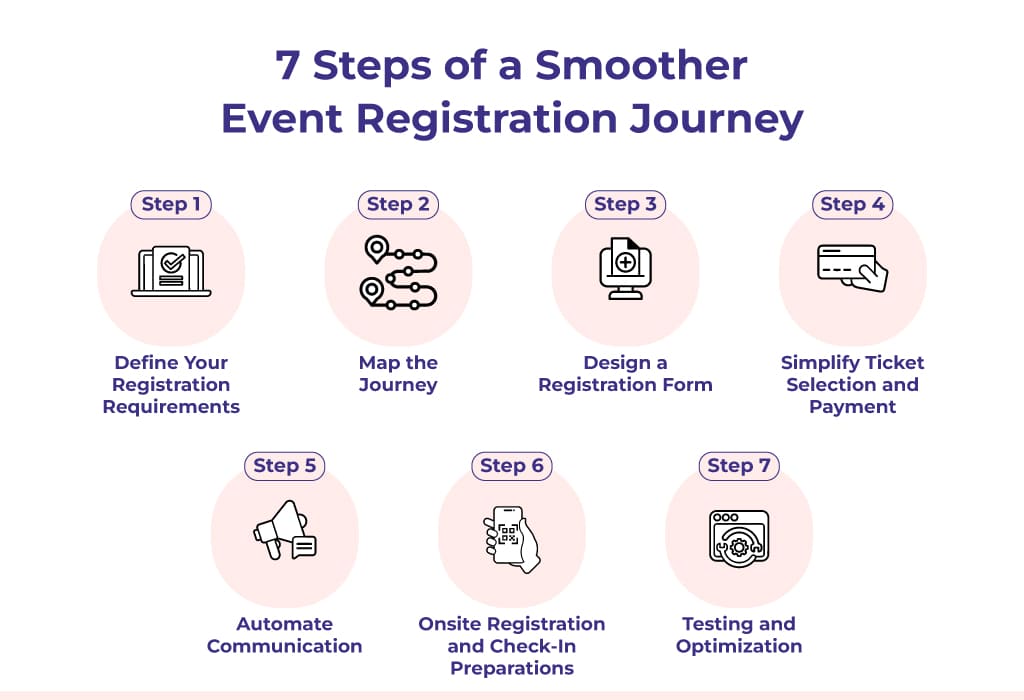
7 Steps of a Smoother Event Registration Journey
Step 1: Define Your Registration Requirements
Step 2: Map the Journey
Step 3: Design a Registration Form
Step 4: Simplify Ticket Selection and Payment
Step 5: Automate Communication
Step 6: Onsite Registration and Check-In Preparations
Step 7: Testing and Optimization
Step 1: Define Your Registration Requirements Before Building Anything
Before creating registration forms or selecting software, take some time to understand exactly what your event requires.
Every event is different, and your registration flow should reflect that.
68% of attendees say hands-on product demonstrations are the most valuable part of an exhibition experience.
A conference focused on executive networking will not collect the same information as a trade expo featuring exhibitors and thousands of visitors. Likewise, an internal corporate event may have completely different registration needs than a paid industry summit.
Understand Your Type of Event
The first step is identifying the format of your event because it influences almost every stage of the registration journey.
For example:
- Conferences often require session selections, speaker information, and networking preferences.
- Expos and trade shows may include visitor registrations, exhibitor applications, and lead retrieval requirements.
- Corporate events might focus on employee registrations, department information, or internal approvals.
- Hybrid events need separate registration paths for in-person and virtual attendees. This is because approximately three-quarters of event registrations are now for in-person or hybrid events, according to vendor data analyzed by Forrester.
Identify Your Different Attendee Categories
Not everyone attending your event should go through the same registration process.
You need to think about all the different groups involved, such as:
- General attendees
- VIP guests
- Speakers
- Sponsors
- Exhibitors
- Media representatives
- Staff and volunteers
- Students or guests
Each group may require different registration questions, ticket types, confirmation emails, or onsite access permissions.
For example, an exhibitor might need to submit company details and booth preferences, while a general attendee only needs to choose a ticket and complete payment.
Decide What Information You Actually Need
One of the biggest mistakes organizers make is asking for too much information during registration.
While it’s tempting to collect as much attendee data as possible, every additional field increases the time it takes to complete the registration process. In many cases, this leads to unnecessary drop-offs.
Instead, ask yourself whether each question is genuinely required before the event. Typically, most organizers need information such as:
- Full name
- Email address
- Mobile number
- Company name
- Job title
- Ticket type
- Dietary preferences (if applicable)
If additional information is only relevant for certain attendees, use conditional fields so those questions appear only when needed.
Step 2: Map the Complete Registration Journey
Once you have identified your event requirements, it is time to map out the entire registration journey.
We would suggest that, instead of thinking only about the registration form, you consider every interaction attendees have with your event. Whether it is the moment they discover it or the moment they arrive at the venue.
Registration Journey for a Successful Event
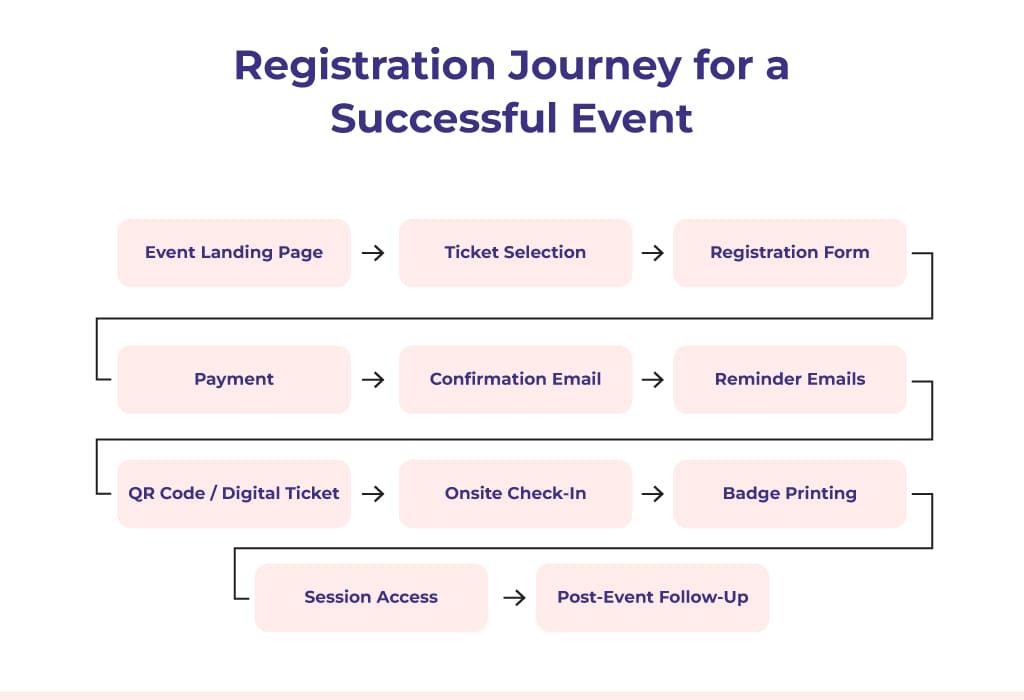
Here is the purpose of each registration phase:
| Registration Phase | Purpose |
| Event Landing Page | Introduce the event and encourage registrations |
| Ticket Selection | Let attendees choose the appropriate pass |
| Registration Form | Collect essential attendee information |
| Payment | Complete ticket purchase securely (if applicable) |
| Conformation Email | Confirm successful registration |
| Reminder Emails | Share important event updates before the event |
| QR Code or Digital Ticket | Prepare attendees for quick onsite check-in |
| Event Check-In | Verify attendance and issue badges if required |
| Post-Event Follow-Up | Share feedback forms, certificates, or event resources |
Looking at your registration flow this way makes it easier to identify where attendees might experience friction. For example, if many visitors abandon the process before completing payment, you know exactly where to investigate and optimize.
You create a smoother journey for attendees while giving your event team a more organized process to manage by planning each stage in advance.
Step 3: Design a Registration Form That People Actually Complete
Once you have mapped the registration journey, it’s time to focus on one of the most important parts of the process, and that is the registration form.
Did you know that 22% of large enterprises use six or more event technology platforms, making integrated registration systems increasingly important? Well, now you do.
This is where interested visitors become confirmed attendees. A well-designed form encourages people to complete their registration, while a complicated one often leads to drop-offs.
The goal is to collect the information you need without making the process feel like a chore.
Keep It Short and Relevant
One of the biggest reasons people abandon registration forms is that they take too long to complete.
Instead of asking every possible question, focus only on the information that is necessary for your event. If additional details can be collected later, avoid including them in the initial registration form.
A shorter form is quicker to complete, reduces frustration, and often results in higher registration completion rates.
Use Conditional Fields
Not every attendee needs to answer the same questions.
For example, exhibitors may need to provide company information and booth requirements, while speakers may need to submit session details or presentation topics. General attendees, on the other hand, usually only need to provide basic contact information.
Using conditional fields keeps your forms clean by displaying additional questions only when they are relevant.
Make the Form Mobile-Friendly
Many people register for events using their smartphones or tablets.
If your registration form is not optimized for smaller screens, users may struggle with tiny text, difficult navigation, or slow-loading pages. These issues can discourage potential attendees from completing their registration.
A mobile-friendly form should have responsive layouts, easy-to-tap buttons, clear input fields, and minimal scrolling.
Make Progress Feel Easy
Long registration forms can feel intimidating, especially when attendees do not know how much remains to be completed.
If your event requires multiple steps, consider adding a progress indicator so attendees can see where they are in the process.
Even simple improvements like auto-filling information, saving previous selections, or clearly highlighting required fields can make the registration experience smoother.
Step 4: Simplify Ticket Selection and Payment
Once attendees decide to register, the next step should feel straightforward, not confusing.
Complicated ticket structures or payment issues can create unnecessary friction and lead to abandoned registrations. A simple, transparent ticketing process helps attendees make decisions quickly and complete their registrations with confidence.
Organize Ticket Types Clearly
Large events often offer multiple ticket options, including:
- Early-bird passes
- Standard tickets
- VIP passes
- Student registrations
- Group bookings
- Speaker or exhibitor passes
If certain ticket categories have limited availability or deadlines, communicate that information clearly during registration.
Offer Secure and Flexible Payment Options
For paid events, the payment experience should be fast, secure, and reliable.
Attendees expect to pay using their preferred method, whether it’s a credit card, debit card, digital wallet, UPI, or bank transfer (where applicable).
Your registration platform should also provide instant payment confirmations and digital receipts so attendees know their registration has been completed successfully.
Read More: – How Can I Create an Event Registration Page With a Payment Link and Receive Payments Directly in My Bank Account?
Be Transparent About Pricing
Unexpected charges are one of the quickest ways to lose attendee trust.
Display ticket prices clearly and let attendees know about any applicable taxes, service fees, or processing charges before they reach the payment page.
If you are offering promotional discounts or early-bird pricing, make the savings visible so attendees understand the value of registering sooner rather than later.
Keep Refund and Cancellation Policies Easy to Find
Sometimes attendees need to cancel or transfer their registration due to changes in their plans.
Instead of hiding your cancellation policy in the fine print, display it where attendees can easily find it during registration.
Step 5: Automate Communication Throughout the Registration Journey
Registration does not end when someone clicks the “Register Now” button.
Keeping attendees informed before the event is just as important as getting them to sign up in the first place. Regular communication builds excitement, answers common questions, and helps reduce no-shows.
Fortunately, much of this communication can be automated.
Send Instant Registration Confirmations
The moment someone registers, they should receive a confirmation email.
This email should reassure attendees that their registration has been completed while including important details such as:
- Registration confirmation
- Ticket information
- Payment receipt (if applicable)
- Event date and venue
- Contact information for support
Schedule Reminder Emails
People often register weeks or even months before an event.
Did you know that 43% of conference attendees register within the final four weeks before an event, making flexible registration systems essential? But without reminders, it’s easy for attendees to forget important dates or overlook event updates.
So, you should consider sending reminder emails:
- One week before the event
- A few days before the event
- The day before the event
Share QR Codes or Digital Tickets Before Event Day
Sending QR codes or digital tickets in advance helps streamline the onsite experience.
Instead of searching through emails or waiting at the registration desk, attendees can simply present their QR code for quick verification.
This is because 92% of attendees planned to attend more in-person events in 2024 compared to the previous year, reflecting continued demand for live experiences.
Keep Attendees Updated
Sometimes event details change after registrations have opened.
Whether it is a new keynote speaker, an updated agenda, a venue change, or important event announcements, timely communication keeps attendees informed and engaged.
Automated email campaigns make it easy to send updates to all registered attendees without manually contacting each participant.
Step 6: Prepare for Onsite Registration and Check-In
A well-designed registration flow does not end when attendees complete the online registration form. The onsite experience is just as important.
80% of attendees say in-person events are the most trusted marketing channel, making registration and attendance experiences more important than ever.
Imagine attendees arriving at your event only to find long queues, manual verification, or delays in badge printing. Even if the online registration process was seamless, a slow check-in experience can negatively impact their first impression of the event.
Planning your onsite registration workflow helps ensure attendees can enter the venue quickly and comfortably.
Use QR Code-Based Check-In
QR codes have become one of the fastest and most reliable ways to verify attendee registrations.
Instead of searching for names manually, attendees simply present their QR code at the registration desk or self-service kiosk, allowing staff to verify their registration within seconds.
Enable Instant Badge Printing
For conferences, expos, and corporate events, badges are often required for networking, access to sessions, and security.
45% of attendees delayed registration until less than four weeks before the event based on a three-year analysis of more than 360,000 registration records.
Printing badges onsite as attendees check in helps ensure the information is accurate while eliminating the need to sort thousands of pre-printed badges. It also makes handling last-minute registrations and badge reprints much easier.
Prepare for Walk-In Registrations
No matter how carefully you plan, some attendees will decide to register on the day of the event. 9% of attendees do not register until they arrive onsite, highlighting the importance of supporting walk-in registrations.
Having a dedicated onsite registration process allows your team to register walk-in attendees, process payments if necessary, and issue badges without slowing down the main check-in line.
Give Your Team the Right Tools
Technology alone isn’t enough. Your onsite staff should know exactly how the registration process works before attendees begin arriving.
Provide clear instructions on using the registration system, handling common attendee questions, managing badge reprints, and resolving registration issues. A well-prepared team can respond quickly to unexpected situations and keep the registration process running smoothly.
Read More: Last-Minute Event Registrations: Smart Ways to Manage Them
Step 7: Test and Optimize Your Registration Flow Before Launch
Even the best registration flow should be tested before it goes live.
Small issues like broken links, payment errors, or missing confirmation emails can create unnecessary frustration for attendees. Testing helps you identify and fix these problems before registrations open.
Test the Experience on Different Devices
Attendees may register using a desktop computer, tablet, or smartphone.
Complete the registration process on different devices and browsers to ensure the experience remains consistent across all platforms. Pay attention to loading speed, form usability, and mobile responsiveness.
Check Every Step of the Registration Journey
Go through the registration process exactly as an attendee would and ask yourself:
- Does the landing page explain the event clearly?
- Is the registration form easy to complete?
- Are payments processed successfully?
- Is the confirmation email delivered instantly?
- Does the QR code work during check-in?
Testing every step helps ensure a smoother attendee experience.
Monitor Registration Performance
Launching registrations is not the end of the process.
Track key metrics such as registration completion rates, abandoned registrations, ticket sales, and payment success rates throughout your campaign.
Reviewing these insights regularly helps you identify opportunities to improve your registration flow before the event begins.

Registration Flow Implementation Checklist
A clear timeline keeps your registration process organized and helps your team stay on track. Use this checklist as a guide and adjust it based on your event timeline.
10–12 Weeks Before the Event: Plan
☐Define registration goals
☐Finalize attendee categories
☐Set ticket types and pricing
☐Identify required attendee data
☐Plan CRM and payment integrations
8–10 Weeks Before the Event: Build
☐Create the registration form
☐Design the event landing page
☐Configure payments
☐Set up confirmation emails
☐Create promo codes (if applicable)
6–8 Weeks Before the Event: Test
☐Test the complete registration flow
☐Verify payments and email automation
☐Validate QR codes and badge data
☐Check integrations and mobile experience
2–6 Weeks Before the Event: Optimize
☐Launch registrations
☐Monitor registrations and ticket sales
☐Optimize the landing page
☐Send promotional and reminder emails
☐Review attendee data
Event Week: Prepare
☐Test check-in devices
☐Prepare kiosks and badge printing
☐Train onsite staff
☐Verify attendee synchronization
☐Set up walk-in registration
Event Day: Execute
☐Monitor check-ins and registrations
☐Manage walk-ins and badge reprints
☐Resolve attendee issues
☐Track attendance in real time
Also Read: 10 Event Registration Mistakes To Avoid in 2026
Make Your Registration Flow Better
Designing an event registration flow is not simply about building an online form. It’s about creating a connected journey that guides attendees from their first interaction with your event to a successful onsite check-in.
When every stage from your landing page and registration form to payment processing, automated communication, and onsite operations is thoughtfully planned, you create a smoother experience for attendees while reducing manual work for your team.
Whether you are organizing a conference, expo, or corporate event, taking the time to design your registration flow carefully can improve operational efficiency, reduce manual work, and create a better attendee experience. A strong event registration partner, like Dreamcast, can support and improve your registration flow for a better event experience.
FAQs
An event registration flow is the step-by-step journey attendees follow—from visiting your event page and registering to checking in onsite and receiving post-event communication.
A streamlined registration flow improves registration completion rates, reduces manual work, and creates a better experience for attendees.
Collect only the information you need, such as name, email, company, ticket type, and any event-specific details required for planning.
Keep your registration form short, optimize it for mobile devices, simplify payments, and clearly communicate the value of attending.
QR codes enable faster onsite check-ins, reduce waiting times, and make attendee verification more efficient.
Yes. Automated confirmation emails, reminders, event updates, and digital tickets help keep attendees informed while reducing manual effort for organizers.