

TL;DR
An Event CRM helps event teams collect, organise, track, and use attendee, contact, and lead data throughout the event journey. It brings information such as registrations, interactions, engagement, communication history, and follow-up activity into a more organised system. This guide explains how Event CRM software works, its key features and benefits, and what to consider when choosing the right solution for your events.
Introduction
Event teams often collect large amounts of information before, during, and after an event. Registration details, attendee profiles, lead information, communication history, engagement activity, and follow-up records can quickly become difficult to manage when they are spread across different tools or files.
An Event CRM (Customer Relationship Management) system helps bring this information together so teams can manage relationships with attendees, prospects, customers, and other event contacts more effectively.
Instead of treating every registration as a separate record, an Event CRM can help teams build a clearer picture of who their contacts are, how they interact with events, and what action may be relevant next.
Depending on the platform, an Event CRM may manage:
- Attendee and contact information
- Registration and event participation data
- Leads and prospects
- Audience segments
- Communication history
- Event interactions and engagement
- Follow-up activities
- Event performance and reporting data
The goal is not simply to store event data. It is to make that data easier to organise, understand, and act on.
Because Event CRM systems may handle personal information, teams also need to consider how that information is collected, used, stored, and maintained. The European Commission’s GDPR principles include purpose limitation, data minimisation, accuracy, storage limitation, and integrity and confidentiality when personal data is processed.
How Does an Event CRM Work?
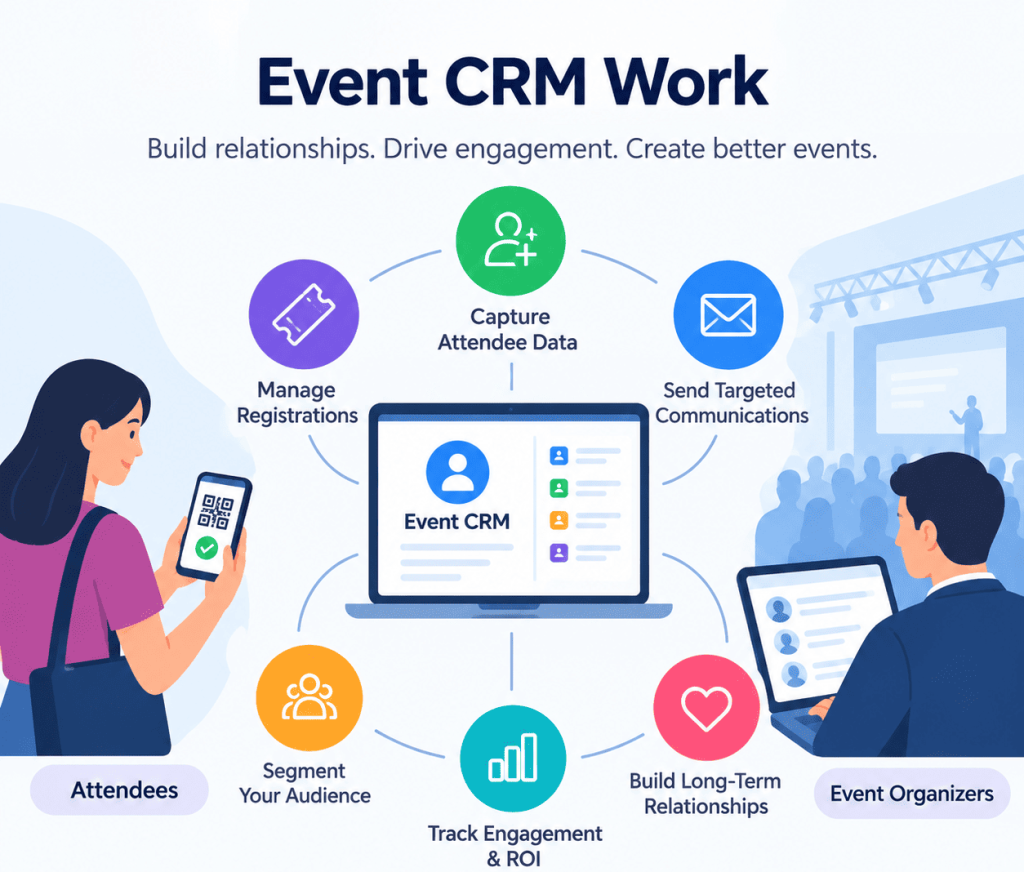
An Event CRM generally works by collecting information from different stages of the event journey and turning it into structured contact and event records. The exact workflow depends on the platform and the event technology connected to it.
Step 1: Collect Event and Contact Data
The process begins with data collection. Information can come from registration forms, event websites, campaigns, check-in activity, lead capture, attendee interactions, surveys, or other connected event tools.
For example, a registration may provide a person’s name, email address, company, job title, ticket type, and communication preferences. Additional event activity can add information about attendance or engagement.
Step 2: Organise and Centralize Contact Information
Once collected, information can be organised into contact or attendee records. Centralising data makes it easier for teams to find relevant information without checking multiple spreadsheets, platforms, or disconnected records. A connected event-data setup can also reduce the need for repeated manual exports and imports between event and CRM systems.
When personal data is involved, the European Commission’s GDPR guidance states that personal data should be accurate and up to date, limited to what is necessary for its purpose, and stored for no longer than necessary.
Step 3: Segment Leads and Attendees
Not every attendee has the same needs or level of interest. An Event CRM can help teams group contacts according to relevant characteristics or behaviours.
Segments might include:
- New leads
- Existing customers
- VIP attendees
- Speakers or partners
- First-time attendees
- Repeat attendees
- Highly engaged contacts
- Contacts requiring post-event follow-up
These segments can then support more relevant communication and follow-up.
Step 4: Track Engagement and Interactions
An Event CRM can connect contact records with useful event activity, depending on the available integrations. This may include registration status, attendance, session participation, lead interactions, survey responses, or other engagement signals.
The UK Department for Culture, Media and Sport’s event-engagement methodology toolkit explains that measuring event engagement can involve different data sources and that those sources need to be evaluated for suitability based on the event and the measurement objective.
Step 5: Automate Communication and Follow-Ups
Once contacts are organised and segmented, teams can use CRM workflows to support communication and follow-up. For example, different messages may be appropriate for someone who registered but did not attend, someone who actively participated, or someone who showed interest in a particular part of the event. Automation can reduce repetitive manual work while helping teams follow up at the appropriate stage.
Step 6: Analyse Event Data and Outcomes
The final step is turning collected information into usable insights. Reporting can help teams understand registrations, attendance, engagement, campaign performance, and other event outcomes.
The UK Government’s DCMS methodology toolkit also highlights the need to identify, evaluate, and select suitable data sources when measuring event attendance and engagement.
Key Features of Event CRM Software
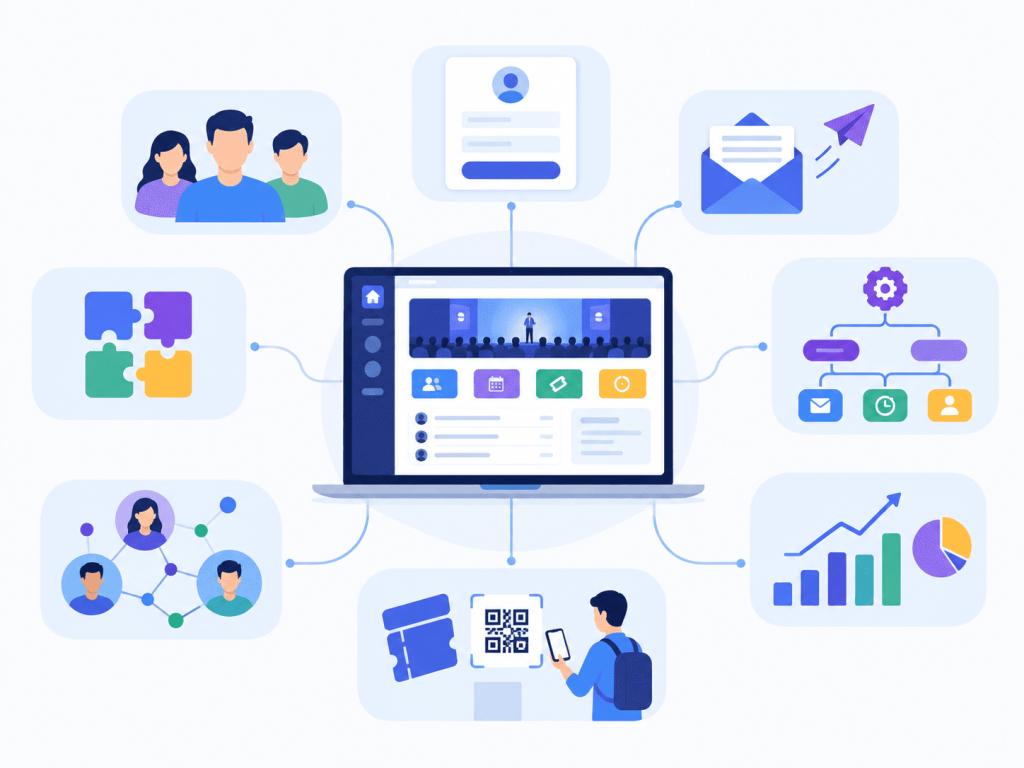
Event CRM software typically combines contact management, lead tracking, audience segmentation, communication, engagement tracking, reporting, and integrations. Exact capabilities vary by platform.
1. Contact and Attendee Management
Centralises attendee profiles, contact details, registration information, and event history, giving teams a more organised view of each contact.
2. Lead Management and Categorisation
Captures and organises leads from registrations and event interactions, helping teams categorise prospects and plan relevant follow-ups.
3. Audience Segmentation
Groups contacts by characteristics, registration details, engagement, or other criteria so teams can tailor communication to different audience groups.
4. Event Communication and Automation
Supports event communication such as invitations, reminders, updates, and post-event messages, with automation reducing repetitive manual work.
5. Engagement and Interaction Tracking
Tracks relevant attendee activity, such as attendance, participation, or interactions, giving teams more context than registration data alone.
6. Event Data and Reporting
Turns event data into reports on areas such as registrations, attendance, engagement, and campaign performance, helping teams understand event activity and outcomes.
7. CRM and Event Technology Integration
Connects the Event CRM with other sales, marketing, and event systems. When evaluating integrations, check supported systems, data fields, sync frequency, and how duplicates or errors are handled.
Benefits of Using an Event CRM
An Event CRM helps event teams centralise contact data, manage attendee and lead relationships, personalise communication, automate follow-ups, and connect event activity with business outcomes.
1. Centralise Event and Contact Data
An Event CRM brings attendee, contact, registration, lead, and engagement information into a more organised system. This makes data easier to access and reduces the need to manage information across disconnected files and platforms.
2. Improve Lead and Attendee Management
A centralised contact history gives teams better context about attendees and prospects. Teams can segment audiences, track relevant interactions, and identify contacts that may need further engagement or follow-up.
3. Personalise Communication and Engagement
Event CRM data helps teams tailor communication based on attendee profiles, interests, registration details, and event activity. A first-time attendee, existing customer, speaker, or prospective buyer can receive communication that is more relevant to their relationship with the event.
4. Automate Follow-Ups and Reduce Manual Work
CRM workflows can automate repetitive tasks such as reminders, attendee communication, lead follow-ups, and post-event messages. This reduces manual list management and helps teams follow up consistently.
5. Connect Event Activity With Business Outcomes
An Event CRM can connect registration, attendance, engagement, and follow-up data with broader sales and marketing processes. This helps teams understand what happened beyond registration numbers and use event data for post-event follow-up and future planning.
How to Choose the Right Event CRM
Choose an Event CRM based on your event requirements, audience, existing technology, and future needs rather than its feature list alone.
Tip 1: Match the CRM to Your Event Requirements
Consider your event type, audience size, number of events, registration process, lead requirements, and attendee data needs. Make sure the platform can support your current event workflow and scale as your programme grows.
Tip 2: Check Integrations and Data Flow
Confirm that the CRM connects with the event and business systems your team already uses. Check what data can be transferred, how often it syncs, and how duplicates or errors are handled.
Tip 3: Evaluate Automation and Reporting
Look at which repetitive tasks can be automated, such as reminders, communication, and follow-ups. Also check whether reporting gives your team the information needed to understand registrations, attendance, engagement, and post-event activity.
Tip 4: Consider Usability, Security and Support
The CRM should be practical for the people using it every day. Consider ease of use, data security, scalability, customer support, and whether the platform can continue to meet your requirements as your event operations become more complex.
Make More of Your Event Data!
An Event CRM is most useful when it turns scattered event information into organised, actionable contact data. From registration and segmentation to engagement tracking, communication, reporting, and post-event follow-up, it can help teams manage the attendee relationship beyond a single event.
The right solution should therefore be chosen around your event requirements, data needs, audience, workflows, integrations, reporting expectations, and ability to scale, not simply the number of features listed on a product page.
Frequently Asked Questions
An Event CRM is a system used to organise and manage attendee, contact, lead, communication, engagement, and event-related data throughout the event journey.
It collects event and contact information, organises it into usable records, segments audiences, tracks relevant interactions, supports communication and follow-up, and provides reporting on event activity.
Common features include contact and attendee management, lead management, audience segmentation, communication automation, engagement tracking, reporting, and CRM or event technology integrations.
An Event CRM can centralise event data, improve attendee and lead management, support personalised communication, reduce manual follow-up, and provide better visibility into event engagement and outcomes.
Not necessarily. Event management software may cover broader event operations such as registration, ticketing, scheduling, check-in, and event logistics. An Event CRM focuses more specifically on managing relationships, contact data, lead information, engagement, communication, and follow-up. Some event technology platforms combine or integrate these capabilities.